 Tide
Tide

Tide · Terminal RSS & Atom reader
Your feeds, one screen, no browser tab.
Subscriptions, headlines and the article in three panes, driven from the keyboard.
A feed reader is a list, a list and a body of text. That is exactly the shape a terminal is good at.
Tide keeps your subscriptions, the headlines and the article on one screen, and moves through all three from the keyboard. It is also where the rest of the family began.
The reader
Keyboard throughout
Move through headlines with j and k, open with o, cross panes with Tab. ? gives a searchable key list.
Three panes, one screen
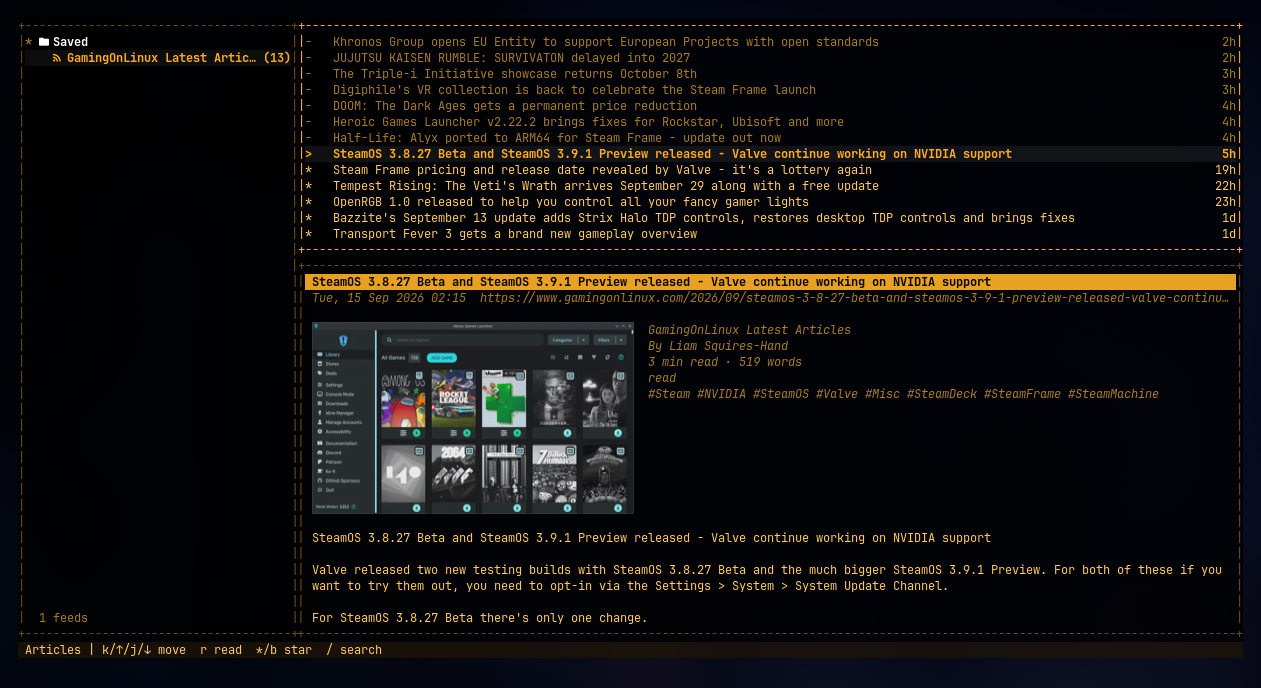
Feeds and folders on the left, headlines in the middle, the article on the right. Opening a piece never hides the queue behind it.
Search your feeds
Filter headlines as you type. The query stays live while you move through what matches.
Themes that stay readable
The same contrast-checked palettes as the rest of the family, previewed live before you commit.
Also in the reader
Reading
- A unified unread viewEverything new across every feed in one list, or drill into a single feed or folder.
- Articles as clean textThe reading pane renders each item as readable terminal text. No browser, no chrome.
Where it came from
- The family started hereThe three-pane layout, the live theme preview and the soft modal language were designed for reading feeds, then pulled out into tideui.
- Learn it onceLearn Tide's keys and you already know how to drive TideMail, TideFTP and WhatTheDock.
A real screen, not a mock-up.
Subscriptions, headlines and the article, exactly as it runs.
Still early
- Built from limited information. This page will grow once the repository's README is the source of truth.
- Building from source is documented in the repository.
One line, then start reading.
Prefer to build it yourself? The repository has the build instructions.
One line
curl -fsSL https://raw.githubusercontent.com/allisonhere/tide/main/install.sh | shThen
tide