 Tide
Tide

TideFTP · Terminal file transfer client
FileZilla's layout, lftp's muscle.
SFTP, FTP and FTPS over one set of keys, in a terminal that is pleasant to live in.
A polished two-pane transfer client for the terminal is a niche almost nobody occupies.
Most "TUI FTP" is a file manager with a protocol layer bolted on, or a scriptable CLI with no interface at all. TideFTP is the part in between: the queue, the progress and the conflict prompts, on screen.
The whole client
A real transfer queue
Parallel transfers, per-file and overall throughput, a live ETA, retry and cancel per row. Interrupted transfers resume from the byte they stopped at.
Directory mirror
Walks both trees, queues only what's missing or changed, and shows a new, updated and unchanged plan first. Prune is one keystroke, and opt-in.
Preview without downloading
The first 128 KB as syntax-highlighted text, or a hexdump for binaries. It never pulls the whole file.
Edit in place
Checks a file out to a temp copy, opens your editor, and writes it back if you changed it. Either pane.
Everything else, keyboard first
Move
- Conflict policiesOverwrite if newer, if a different size, resume, rename or skip. Apply to one, apply to all, or remember it for the session.
- Resume, not restartAn interrupted transfer picks up where it stopped, on both ends.
Inspect
- Filter and sort / sType to narrow a listing by glob or substring. Cycle sort by name, size, date or type, per pane.
- Change permissions mAn octal prompt pre-filled with the current mode, echoing back the rw-r--r-- it decodes to. Local and SFTP.
Keep it safe
- Post-transfer verifyOpt in, and every completed transfer is re-read on both ends and compared by SHA-256.
- Strict host keysChecked against known_hosts by default, with an explicit trust-once or trust-and-remember prompt. No silent accept.
- Passwords never in argvRead from the environment or typed into the form, so a flag never leaves the secret in the process table.
- Auto-reconnectRedials after an unrequested drop, backing off 2, 4, 8, 15, then 30 seconds, and puts you back in your directory.
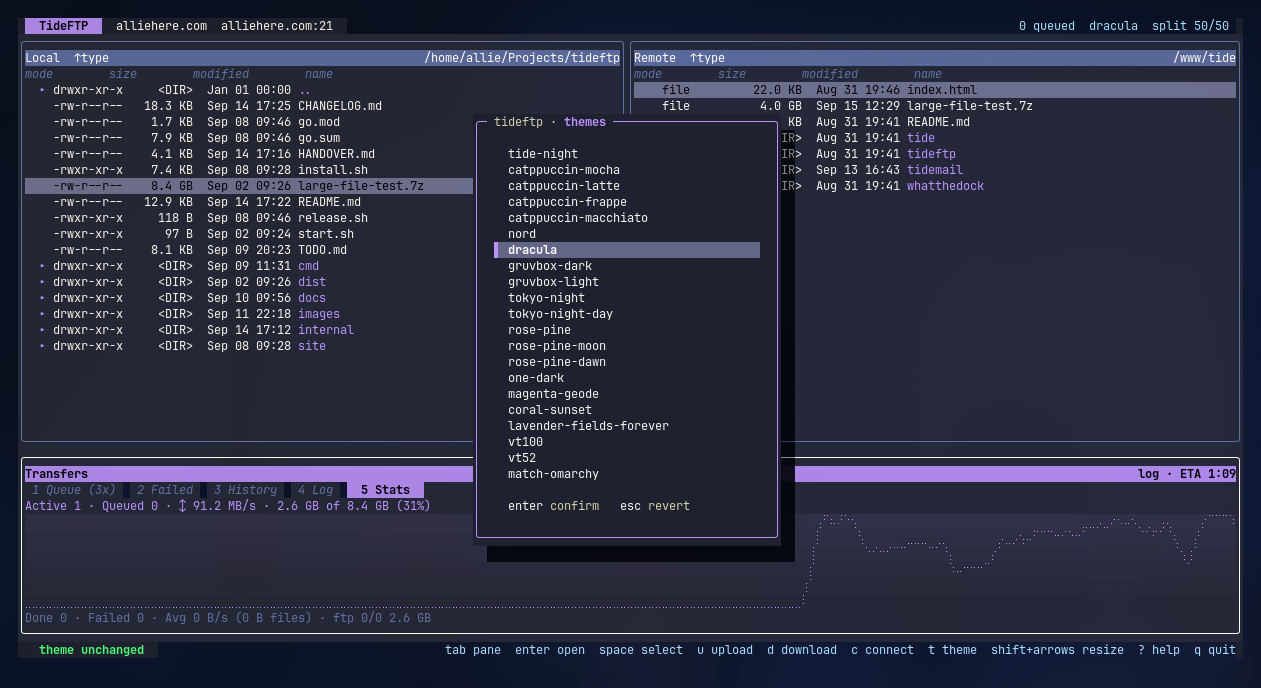
Two panes, one queue.
Local on the left, remote on the right, transfers underneath. Here with the theme picker open.
Different where it counts
An honest read against the tools people reach for now.
| Capability | TideFTP | lftp | mc | FileZilla |
|---|---|---|---|---|
| Two-pane visual UI | ● | ○ | ● | ● |
| Transfer queue with conflict policies | ● | ◐ | ○ | ● |
| Directory mirror with pre-flight plan | ● | ● | ○ | ● |
| Streaming preview and in-place edit | ● | ○ | ◐ | ○ |
| Runs in a terminal, over SSH | ● | ● | ● | ○ |
| Scriptable and headless | ○ | ● | ◐ | ○ |
| Cloud storage backends | ○ | ○ | ○ | ○ |
● full ◐ partial ○ none. For scripted bulk sync or S3 and GCS, reach for lftp or rclone. TideFTP is for the interactive session.
What it isn't, yet
- Not a cloud client. SFTP, FTP and FTPS only. S3, GCS and Dropbox are rclone's job.
- Not scriptable. No headless mode. For cron and pipelines, lftp and rclone win outright.
- Still filling edges. Queue persistence across restarts, bandwidth limiting and directory bookmarks are on the roadmap, not in the build.
- Pre-1.0, one maintainer. lftp has absorbed decades of protocol quirks. TideFTP handles what pkg/sftp and jlaffaye/ftp expose, which is why FTP has no chmod.
Two minutes to your first transfer.
FTP and FTPS read the password from TIDEFTP_FTP_PASSWORD. SFTP uses your agent and ~/.ssh keys. To build from source instead, you need Go 1.26 or newer.
One line
curl -fsSL https://raw.githubusercontent.com/allisonhere/TideFTP/main/install.sh | shThen connect
tideftp